


 Overview
 Multiplication table
Receipt
ReceiptThis solution shows a receipt for a car repair service. It includes 6 different items, each item has name and amount. The total due is shown at the bottom of the amount column and shows the numerical summary of the data of the column.
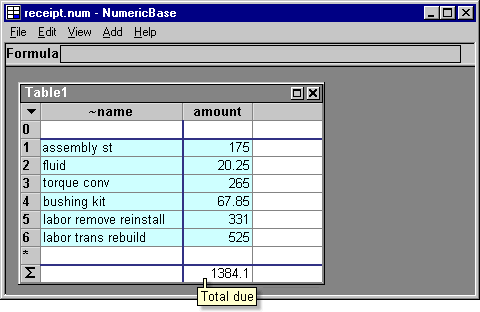
Screenshot: the receipt example.
The cheaper provider
After we got the receipt from the original repair service, we contacted another provider , to review the receipt and to offer a better price. The cheaper provider looked at the receipt and said "all the prices seems reasonable, except the labor trans rebuild - I can make it for $300 instead of $525".
The following solution uses just two formulas to add the information about the cheaper provider.

Screenshot: adding information about the cheaper provider.
We can also calculate how much we could save by selecting the cheaper provider. To due this we add a new column that shows the difference in the prices between the two providers.

Screenshot: calculating the difference in prices with just one formula.
The source code
Following is the source code for this example. To use it in your copy of NumericBase, copy and paste it in the View Source window.
table Table1{
~name:=!
amount:=!
cheaper:=amount!
savings:=amount-cheaper!
<1>:={~name:="assembly st",amount:=175,}
<2>:={~name:="fluid", amount:=20.25,}
<3>:={~name:="torque conv", amount:=265,}
<4>:={~name:="bushing kit", amount:=67.85,}
<5>:={~name:="labor remove reinstall", amount:=331,}
<6>:={~name:="labor trans rebuild", amount:=525,cheaper:=300,}
}
optimized(14,40) result(Table1);
Source code for the receipt example
Copyright © 2003 - 2026 by symbol click. Contact info