

Numericbase
 Overview
- More details
 Value types
- Formula terms
- Formula operators.
- The if operator
- Operators precedence.
- Formula appearance.
- Formulas with errors
- Row Names and column numbers
- More about referring to other cells
- The base rules
- More about range formulas
- Functions
- summary functions
- The plot and collect functions
- User functions
- The "find" function
- Instantiated tables
- The NumericBase language
- Examples
- Download
- Faq
The plot and collect functions
The plot and collect functions.The plot function scans the rows of the table and collect the numerical data to a create a plot. The function gets two arguments, the first for x values, and the second for y values.
The following screenshot shows example of plot usage. To see the actual plot, click the plot icon
 that is formed at the cell containing the plot formula.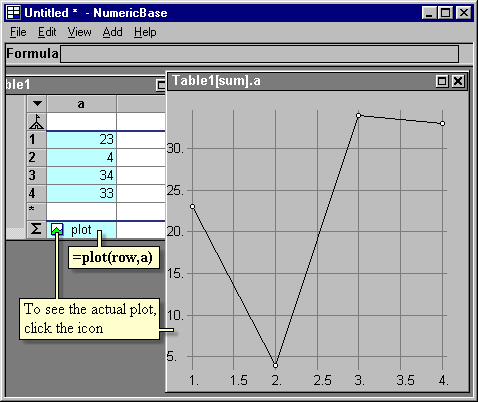
Screenshot: Using the plot function
The collect function let you combine several plots into one display. You can use it to collect all the plots as shown in the Saving account scenarios example. You can also use it locally to combine several plots as shown in the following example:
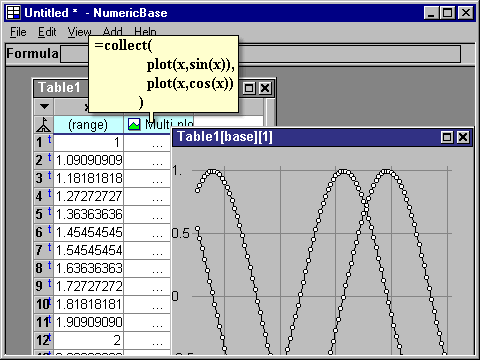
Screenshot: using the collect function
Copyright © 2003 - 2026 by symbol click. Contact info