

Numericbase
 Overview
- More details
 Value types
- Formula terms
- Formula operators.
- The if operator
- Operators precedence.
- Formula appearance.
- Formulas with errors
- Row Names and column numbers
- More about referring to other cells
- The base rules
- More about range formulas
- Functions
- summary functions
- The plot and collect functions
- User functions
- The "find" function
- Instantiated tables
- The NumericBase language
- Examples
- Download
- Faq
summary functions
Build in summary functions.The build-in summary functions let you perform a summary of all the data rows of a table. Each function gets a specific number of arguments, evaluates these arguments separately for each row, and performs some specific calculation on the results.
The following table shows some of the summary functions. Each summary function expects values of certain type (shows in "expected type" column). If a value is not of this type, it is converted to it automatically.
|
Using summary functions locally.
You can use the summary functions to summarize a set of values locally. To do that, you need to select one of the summary function that has only one parameter (for example, wavg is not qualified). Then, you give it more than one parameter.
When you doe this, the functions does not scans all the data rows of the table. Instead, it scans the arguments and perform the required operation. For example, =sum(3,4,5) evaluates to 12 because 3+4+5 equals to 12.
summary functions with more than one output value
Some summary functions produces more than one output value. More specifically, they have one output value for each row of the table. You can use them at the base row - the values are shown in the same column across the different rows of the table.
For example, the sort summary function can be used to produce a column that have all the values of another column in sorted order - see the following screenshot for an example. Note that it works independently from the sorting functionality introduced in the "Overview" section
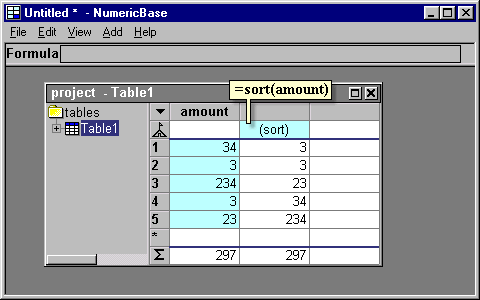
Screenshot: the "sort" summary function
Other function like this is mavg(values, num_points) , which let you produce a moving average.
Copyright © 2003 - 2026 by symbol click. Contact info