

Numericbase
 Overview
- More details
 Value types
- Formula terms
- Formula operators.
- The if operator
- Operators precedence.
- Formula appearance.
- Formulas with errors
- Row Names and column numbers
- More about referring to other cells
- The base rules
- More about range formulas
- Functions
- summary functions
- The plot and collect functions
- User functions
- The "find" function
- Instantiated tables
- The NumericBase language
- Examples
- Download
- Faq
User functions
User functionsNumericBase let you define your own functions. To do this, you need to add a new column and give it a name that can behave as a "function signature".
Function signature
A function signature is composed of the function name followed by zero or more parameter names separated by commas and surrounded by parentheses. For example: user_function(x,y,z). The parameter names can not repeat themselves. For example : user_function(x,x) is not a valid function signature.
The body
The body of the user function is defined as a formula in the base row. You can override this body at any other row.
For example, the following screenshot shows a user function named func(x). The body of the function, shown in the base row e of this column, is =x*10. On the other column there is a formula that uses this function =func(45). The function body is overridden in row number 2 to be =x/2. The corresponding row that uses this function is now 22.5 instead of 450.
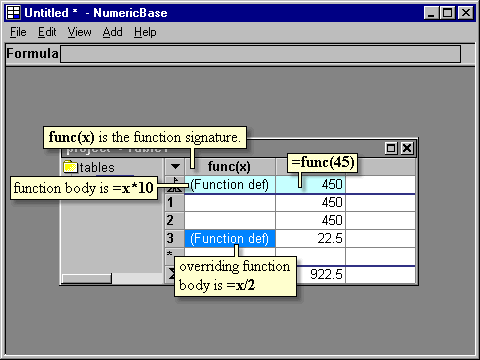
Screenshot: using a user function
Copyright © 2003 - 2026 by symbol click. Contact info