


Numericbase
 Overview
 Entering data
- The project window
- The base row
- Overriding the base row
- Color coding
- Hide Repeating values
- The summary row.
- Sorting
- Referring to other cells
- Range formula
- Circular dependency
- View source
- Using more than one table
- Import, export, and delete
- Windowing Optimized Mode
- Windowing Solution layout
- More details
- Examples
- Download
- Faq
Using more than one table
Using more than one tableNumericBase let you define more than one table in a solution. To add tables to your solution, use the project window as shown in the following animated screenshot:
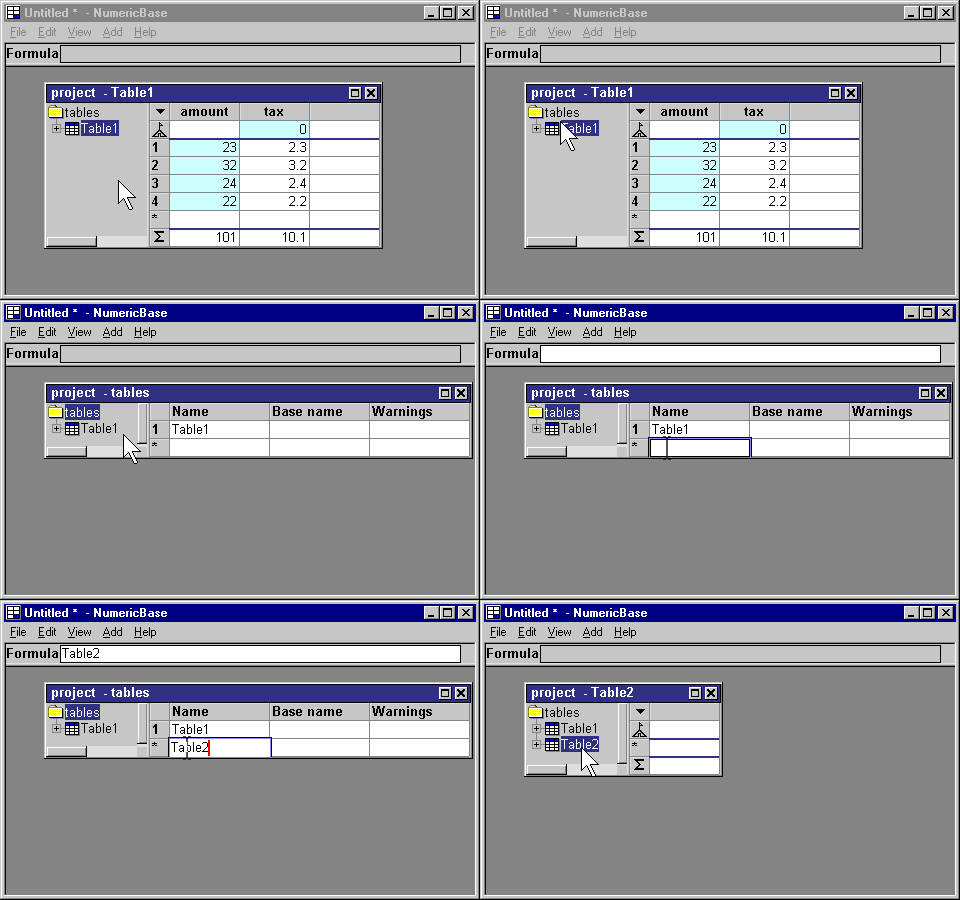
Animated screenshot: adding a table.
Several tables work together.
The different tables in your solution can solve several unrelated problems, or work together to solve a complex problem in the following ways:
- Formulas in one table can refer to values from other tables.
- One table can use another table as an instantiated table.
- One table can be based on another.
- The panel window can group together several tables in one display.
Copyright © 2003 - 2025 by symbol click. Contact info