


XML Marker
 Features
 Quick start
- The Tree View
- The Icons
- The Tree Selection Browser
- The subtags table
- Multiple occurrences.
- Unique attributes and subtags.
- Syntax checking
- Tools to modify xml.
- Color-coded text range highlighting
- Navigation
- Indentation
- The Table Selection Browser
- DTD support
- Limitations - please read.
- Use Cases
- Version 2.0 change log
- download
Indentation
IndentationThe indentation function inserts (and removes) spaces and new line characters to make your XML code appear better and more readable. This function relays on the hierarchal nature of your xml.
Indentation options
There are several indentation options that you can choose from, all are accessible from the "Indent Options" located at the options menu:
- Indent size: the number of spaces added at the beginning of new indent block
- Maximum number of attributes in tag line: if the number of attributes in a specific xml tag exceeds this number, then XML Marker will create a new line for of the tag attributes. Otherwise, it puts them all in one long line
- Remove comments: checking this option will remove all comments from your XML code.
To use this feature press Ctrl+I. You can also select "Indent" from the edit dialog, or click on in indent icon
 , located in the toolbar .
Screenshot
The following screenshot shows the indent options dialog:
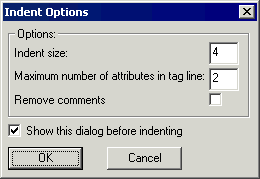
Screenshot: the indent options dialog
Copyright © 2003 - 2026 by symbol click. Contact info